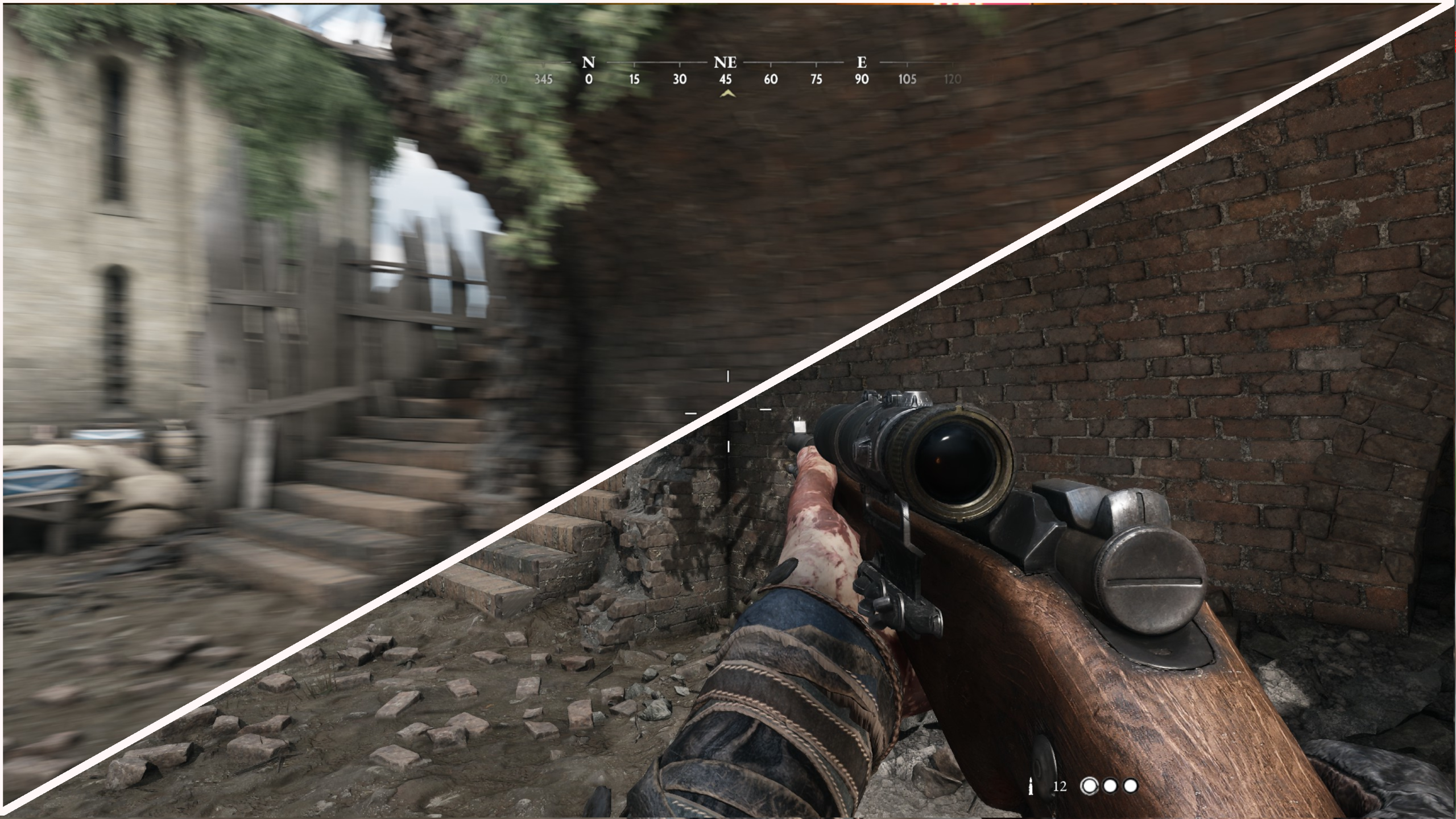
Just a little amusing and not that surprising.
Lenses flare and motion blur are some of the first setting I turn off in any game.
I hate DOF, too. Your eyes aren’t a camera, any place you look should be in focus!
My eyes will do the blurring on their own, thank you very much. Same goes for motion blur.
Yeah we see non blurred only in a ridiculously small portion we look at anyways, IIRC it’s in a 3° split angle from the centre (yes you read that correctly, a cone at 3 degrees…).
Still useful for foveated rendering, but that tracking where your eyes are actually looking
- However, your eyes have depth of field view too. Your eyes are actually cameras in that point regard. Look at the monitor, your hand or any object close to you. Focus on it. Notice how the background gets blurry? That’s a feature from your eyes and brain to bring stuff into focus.
- But besides this fact, even if you would see everything in focus, its does not mean the developers of film scenes (movies or games) shouldn’t use DOF as a tool for an artistic expression. It can help bring things in focus in a busy background.
FPS 16.4->120
Screenshake is similarly overused
It’s mind-blowing that most games still default to motion blur on. Makes me think they’re trying to cover up for something.
Every now and then a game will have it off by default and I’ll be like aw yeah. Seems to be happening more often.
Yeah, in quite a few cases (especially a particular generation of console games in which motion blur can’t be disabled) it is covering for something. Some effects like TAA work great if the camera doesn’t whip around quickly, but can leave some “ghosting” if the camera moves too fast. So motion blur makes the ghosting less visible. Film grain is another one that is sometimes used to hide noise in dynamic light reflections and the like. I’m of the opinion that they look like ass but in some games they do look better than what they’re covering up.
Wardogs! Great game
Lens flare doesn’t bother me, but its “Depth of Field” that drives me bonkers. I always turn motion blur and depth of field off.

tf kind of sorcery…this image triggered a weak motion sickness for me
Good motion blur is actually pretty decent but games seem to always use shitty implementations, had to use reshade for it
deleted by creator
They don’t do motion blur on monitors tho
they blur fucking everything, godsdamned astigmatism
Not everything.
You can misread Anything at AstigmatismCom
The infinite is blurry at AstigmatismComWrong. It is selectively blurred in specific direction. It depends on the depth of the element in the game relative to the player view, also hud elements are not blurred too.
Not everything is blurred.
Such a strange argument to hang on about. They’re making a joke about having shitty eyesight. No more, no less.
Nothing strange. I just explained that the eye does not blur everything in the same way as motion blur implemented in a game.
deleted by creator
MY EYES ALREADY MOTION BLUR!
Not when you sit still and watch a monitor / tv that sits still in front of you. Then your eyes do not motion blur. The game adds motion blur because your eyes do not motion blur, let’s say when you play a racing game.
deleted by creator
Um no. Screen is in front of you and you don’t look around with your head. Your eye movements are very fast and little, and your brain changes the perception for you anyway. The important difference is, that blur does not add any sense of speed in example. Let’s say a racing game. If you watch the screen, the ingame graphics can decide to blur the street below to blur a lot (because its close to camera) downwards, as the movement is upwards in the game. And the hud elements are not blurred or the car and the background. That is much different from the blur of you talking, that is probably just a little bit sideways.
I just try to explain that the blur you are talking about is completely different from your eyes and the one I am talking about in the game. Don’t enable this option if you don’t like, but understand at least what it is.
End thread
Ingame Motion Blur is not the same as your eyes blur. Two totally difference subjects.
It’s like talking about the ingredients of a cake: “I already have sugar in my tea, I don’t need sugar in the cake too!”
deleted by creator
It’s not double blurring your game. Programmers can decide which part should be blurred in what strength selectively. Exactly because your eyes and brain blur in real world, the game tries to simulate the effects of blur too. In example in a racing game to get sense of speed, it can blur parts of the ground in example. If you play a racing game, your eyes do not blur the image. So its not blurred twice.
Overall its not the exact same, but it tries to simulate it like we try to simulate light in games as well.
When im looking at the screen and move my eyea across it, my eyes blur.
It does not blur the same way ingame blurs. First this is not motion blur of the subject, its blur because your eyes move. This is different. Don’t forget you have a brain too, which blurs things differently than what you just see. For motion blur, it depends how fast it moves and how close is it to the viewer. When you look on a screen, then you look at a single surface without depth information for your eyes and brain. And as explained in the other comments the subject your eyes look at stays still. The subject does not have any motion.
The blur you get from little movement looking at a screen that does not move is completely different from ingame motion blur that selectively activates motion blur on the scenery.
deleted by creator
Then don’t use it. I just explained to you why your statement was wrong. Nobody forces you to use an option.
But I don’t put sugar in my tea
Doesn’t matter for the metaphor.
i mean i started drinking coffee black so i could take sugar out of one specific area of my diet (sugary drinks) and add it back in another area (candy. what’s your favorite?). I think it ended up being a net reduction.
so like people (okay !<1 person) actually think the way your metaphor is.
Motion blur is great in racing/driving games, but that’s largely it. BeamNG.drive added it a couple updates back and it improves the looks a lot in my opinions. Makes speed feel actually fast.
That’s because that’s a scenario where motion blur is needed the most: when things are moving so fast they might move several pixels within one frame.
BeamNG.drive is never going to have huge speed impression because it’s actually realistic.
Racing games cheat in all sorts of ways to make it feel faster than it actually is.
100% agree, that update made a dramatic improvement to the sensation of speed in Beam.NG.
I just launched Valheim again and disabling DoF and motion blur were both ‘accessibility’ settings. Rustled me jimmies good.
DoF in Valheim is great tho. It cleanly divides the foreground, middle distance, and background, makes LOD features much less obtrusive, and genuinely makes the dense environment scan and visually process better. It is used to both good technical and good artistic effect.
Default setting imo is a bit much. I’d turn it almost all the way down. I’m usually using the top third of the screen to look ahead so DoF can get kind of annoying, since I’m not pointing my crosshair at what I’m looking at.
I really liked when the screen would blur if you were suppressed in bf4. Really made it feel intense and actually gave you a reason to pin down someone with an lmg.
Yeah that and other shell-shock mechanics like the audio fading out and ringing sounds replacing them can be really immersive. But if im just looking left or right I dont want to feel like Im hammered.
Suppression mechanics are different than just raw, constant motion blur
It’s like cool, I’m at home and playing video games drunk and my computer is also drunk.
It’s IMO not the effect itself but how it’s used. Way too often game devs use it to mask low FPS and visual artifacts of incompetent graphic pipeline (usually Unreal Engine)
Issue is motion blur is graphically intensive too so it makes the FPS even worse!
To large extent yes. But whether or not it’s worth it depends on the goal and the type of blur.
Valve IMO does it correctly in Counter Strike, where very tiny amount of blur is applied to give impression that your 100fps looks like 150fps. I prefer this over framgen tech because pretty much no lag is added.
I just don’t understand why it is usually on by default.
For me, film grain is the worst. I first came across it in Left 4 Dead and I remember thinking “wtf is this trash?”
L4D has a big b-movie theme going. That’s why they use filmgrain in places
The first setting I look for in every game
O.o How many games do you play that have film grain?
Everything not indie
You would be surprised how often it is in games. It stands out so much to me it makes games hard to play with it on.
If your character is drunk, drugged, or otherwise impaired, yeah load up the motion blur.
Besides that, I don’t get why it’s there. Stuff just kinda naturally blurs when you turn fast if your eyes can’t keep up. If your eyes can keep up, why would you want it blurry?
per-object is nice. Tip of your sword blurring when swung feels right. https://www.youtube.com/watch?v=ZldCfYGb54c
Because it’s terribly implemented.
Yep, I usually end up installing reshade to tweak it myself. CShade can look pretty good if you tinker around with it.
My little opinions. There are nuances and in some cases I could prefer enabling or disabling a feature, game by game basis. A plus and minus sign in front of the topic is a general conclusion if I like it or don’t. You workout what plus and minus means here.
+Motion Blur: Looking at Motion Blur in a static image is unfavorable to the effect, because it’s an effect that makes only sense to look at it when moving. And there are different implementations of Motion Blur, sometimes making the experience better, in some other cases it makes it worse. I quiet like the effect in racing games, when used correctly. It increases the sense of speed and has no downsides. I do not like it in first person shooters. A good implementation knows why it is implemented and does not blur the entire screen for no reason, and the blur quality is good. So it depends, but I like good and useful blur.
-Chromatic aberration: I hate it. Coming from photography, chromatic aberration is an artifact that decreases the image quality without gaining anything. This is usually a weakness resulting by the camera lens. In a game, I get that they try to emulate filmic experience, but outside of very cinematic cut scenes that look like a scene from a film, I don’t see any benefit. It’s often also used in normal gameplay of action shooter games in example. It just decreases the image quality and perceived sharpness. I hate it. I hate it like sand, it gets everywhere!
+Depth of Field (also known as DOF): I like it. Also coming from photography, the depth of field is a useful technique to bring something in focus. The background be out of focus, so it is less noise. Whatever is in foreground you want to bring attention to, is the main subject and sharp. This is cool effect used in cinema, photography and therefore in cinematic cut scenes in games that look like a film. There are couple of games that use it in gameplay too, but I never liked the look of it (in gameplay). I guess there might be exceptions, like for certain single player sniper games. Overall I like the effect when done good and usually have it enabled.
In some games these effect can cost additional performance, so if that is a critical issue, then I would disable them all probably.
The first time I encountered motion blur was GTA 3 for PC back in like 2003. It was awful so I’ve turned off motion blur on every game since. I have no idea why it was around then or still around now.