I was just reading this thread… https://sh.itjust.works/post/23476261
…and it got me thinking about something that I’ve wanted for a long time. Why is it that keyboards have not evolved to have dedicated copy/paste keys left of the main board? I’d love to see an additional column of keys left of Esc->Ctrl configurable as macros at least. I do a lot of copy/paste for work. The current shortcuts arent terrible or anything but they’re not exactly comfortable. I’d rather move my whole hand to the left for a macro key than contort to hit the current shortcut.
What do you think?
CTRL-C / CTRL-V too much? ;)
Right???
Not exactly. Its just awkward for a bunch of repetitions, especially on MacOS keyboards. CMD+C/V is even worse on those.
Personally since I use touch typing being able to hit ctrl-c,v without looking works best for me. Anything else would require me to shift my hands too far away from the “home row” and slow me down.
I use touch typing
As opposed to taste typing??
Some people never learned touch typing.
Never heard it called touch typing before… Always just “typing”
With 35 years of computer experience I can say that anything except Ctrl+Insert/Shift+Insert is worse.
By that I mean, we all need to adjust our brain to be fluent on which ever ecosystem we are currently logged on to, and become native users of key combos on all we use. I have used MacOS daily since 2004, and linux, Windows and DOS all longer than that. It takes practice, a lot of practice, but in the end I don’t even realize I sometimes use Ctrl+c, other times Cmd+c, and yet again Ctrl+Shift+c. It all comes naturally, by some miracle my brain knows which one to use. Granted, the DOS one I use so rarely these days I need a double take on the Ctrl+Insert. Last time was still around 6 hours ago today.
I guess what I’m saying is keep doing it, you’ll get there.
To paste in Linux:
Ctrl + shift + vin terminal.Ctrl + uin nano but nano doesn’t use the same copy buffer but you can also useCtrl + shift + vbut only to paste something copied from outside nano.To paste in vi(m)
:?!&///<¥₱!Pretty much everywhere else, eg file manager, any GUI, browsers, etc. is
Ctrl +vI also just love that it is beyond simple to create any key combo shortcut for absolutely anything on Linux.
Make that menu key work for the real estate it occupies.
Ctrl + shift + vin terminal.In some terminals. urxvt for example just uses the selection buffer. And either is reasonable, because
Ctrl + Cto send sigterm predatesCtrl + Cto copy.To paste in vi(m)
:?!&///<¥₱!Wut? Is this a joke that it’s difficult to paste in Vim? Because it’s literally just
p.You do need to be in command mode, so alright, there is some complexity there, but you won’t get much closer to just a single key, as OP wants.
You can just move the modifier keys around. I have Caps Lock as Ctrl and Ctrl as CMD.
I use caps lock a lot for stuff, so that probably wouldn’t work well for me, but I’m glad you found a solution that works for you
I find cmd c so much easier that ctrl c. I can hit it with just my thumb. cmd V is basically the same as ctrl C/V
On Windows, it was always farthest left button + C.
Mac, it’s the Apple button + C.
Ive changed that because I hate it. You can change your hotkeys to fit your needs, as well as create macros that trigger events.
Having grown up on chiclet Mac keyboards, you should try a mechanical keyboard. It’s such a much better experience
Your first mistake is using apple products
Can’t help it when your job supplies it to you.
I’ve got Graphene on my phone and Fedora on my desktop.
deleted by creator
Oh man, you were born too late for the wild 90s era of experimental keyboards
While it doesn’t have a copy and paste key, my omnikey ultra is certainly wacky.
my omnikey ultra is certainly wacky
You mis-spelled “clacky”
I was young, but definitely using computers in the 90’s. I remember some wacky stuff.
I disagree. [Modifier] + C & [mod] + V works just as good as a dedicated button and you are using the space more efficiently by having multiple uses for one key.
Keyboard already has a lot of buttons. We should be considering which to remove, not any additions
Come to the vim side, we have
yfor copy (yank) andpfor paste. We even havedfor cutWtf is vim
I’m laughing way too hard at this thank you
The best text editor in the world. With the best training manual.
https://vim-adventures.com/
Timmy, no
Only the best bathroom cleaner ever made.
Ctrl-C and Ctrl-V have been so burned into my muscle memory, relearning to use just a single dedicated button might actually be more trouble for me than just using the standard hotkeys.
That’s the first thing i learned using computers, and not something i’ll ever forget.
That’s why I got a mouse with extra buttons on the side, so I can just copy and paste using my thumb.
Having keys to the left of ctrl is a fucking mess! Ine of my kids have a gaming keyboard with a extra column of keys there and it is a pain to use.
What should happen, is move capslock to the locks row on the tip right side. And give us a new meta key there instead! That would be a win-win
no, never. 34 keys is all you ever need
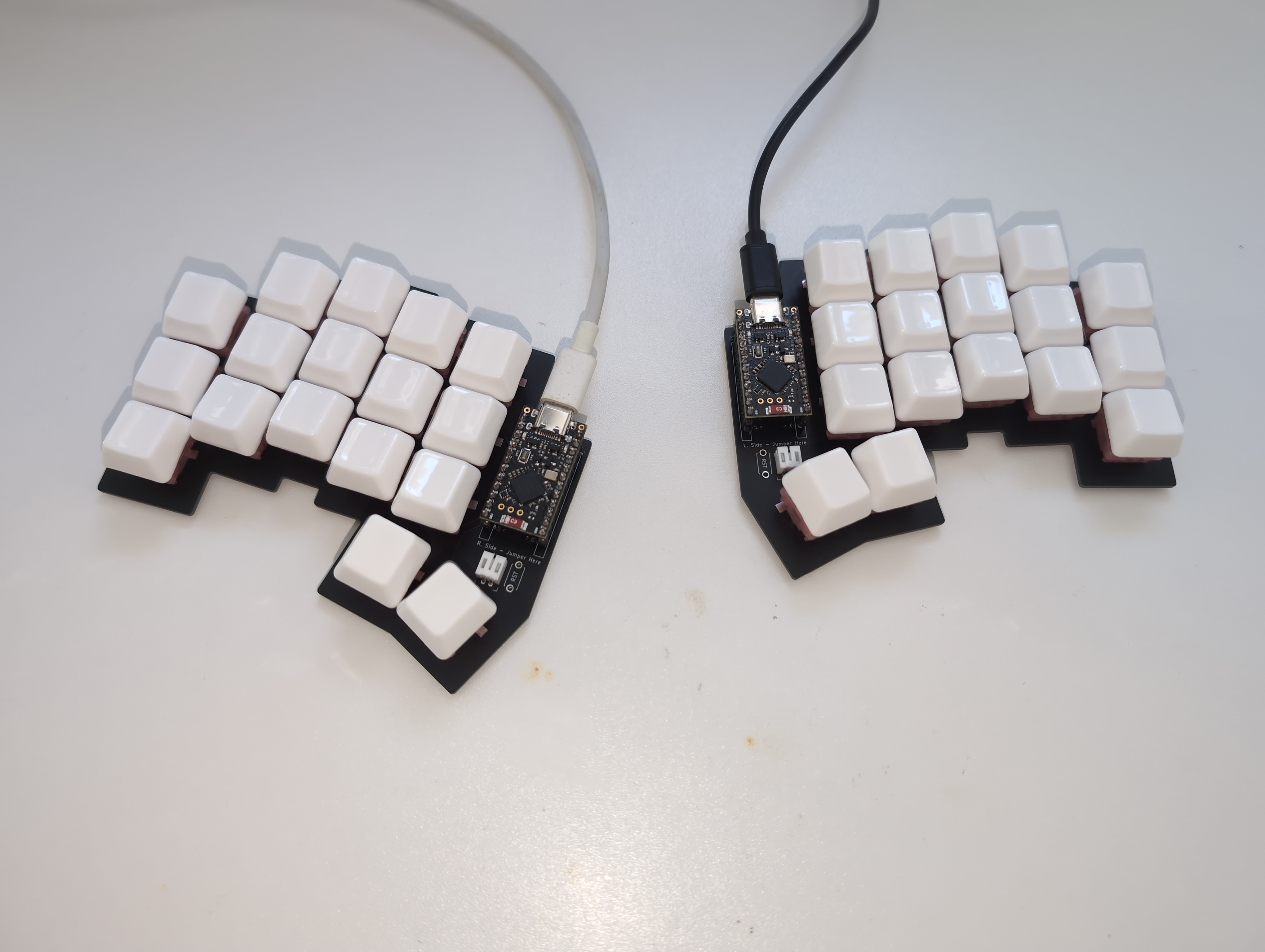
Could you screenshot this again but showing what each key maps too?
Christian Seleg (not sure if spelt correctly, but the Apollo for Reddit dev) has a recent video on his channel about making a keyboard very similar to this shape and it looked really cool but again couldn’t quite understand what key each is.
I configured it using ZMK, it’s a firmware for wireless keyboards. The keyboard is “wireless”, I’m just using USB cables for power while I’m waiting for the batteries to arrive. The keyboard you saw might be the Ferris Sweep, which mine is based on. Well, based on is probably the wrong word, I copied the layout, rotated the pinkies a bit and did the PCB myself using Ergogen and Kicad.
This is my default layer:
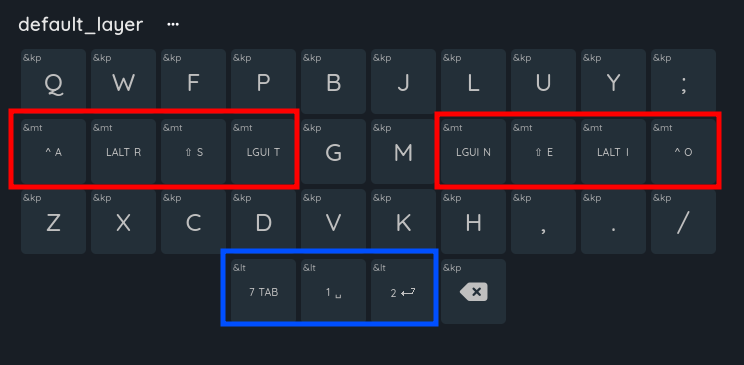
I use the Colemak mod DH matrix layout. Colemak is a common alternative key layout, mod DH is a certain modified version of it, and matrix means that the keys aren’t row staggered. You can also see that some keys have some more stuff on them, those are homerow mods (red) and dual function layer keys (blue). Homerow mods is the name for a common practice on small keyboards where you place modifier keys in the homerow along with the normal keys. Holding them turns them into the modifier and pressing them is just the normal key.
Holding A or O is like holding CTRL R or I is ALT S or E is Shift T or N is the Windows key The keyboard is split so they’re mirrored on the two sides (also useful for when you want to do CTRL+A for example)
The layer shifts function similarly, pressing them results in the normal key (tab, space, enter) and holding them shifts me to a different layer (layer 7, layer 1 (its 0 indexed), and layer 2). Layer 7 has function keys, layer 1 is for navigation and layer 2 has my symbols.
layer 1:
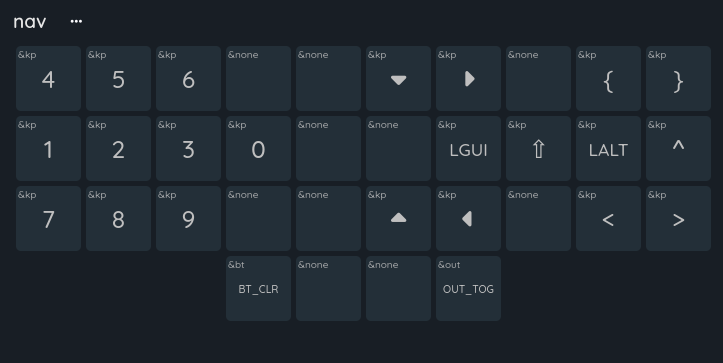 (here you can see that I technically have a “numpad”, just that it’s always directly under my hand instead of off to the side
layer 2:
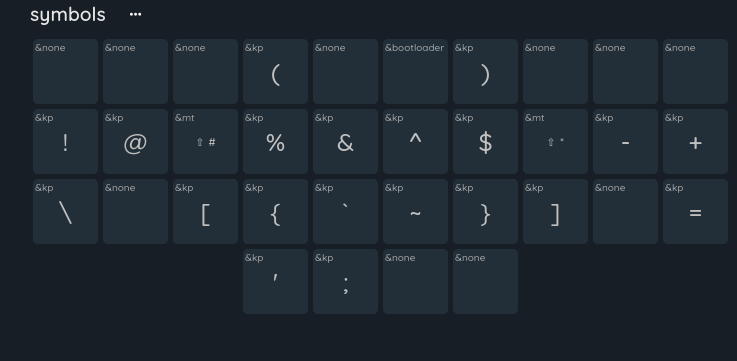
layer 7:
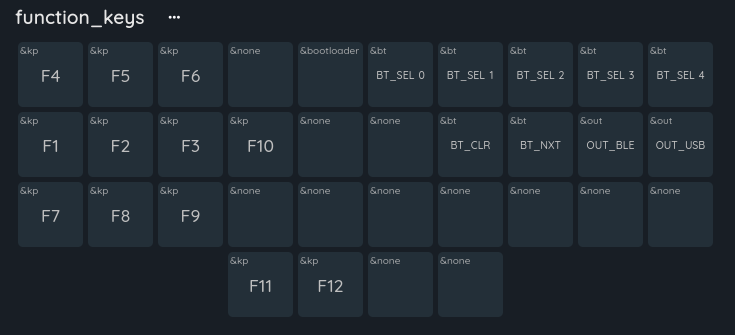
I have 11 layers in total, but the other 7 are just special layers for games. I use this keyboard for everything, including programming and gaming without any issues.
edit: not sure why people downvoted you, it’s an awesome question and I’m glad you gave me an excuse to spam you all with info about my keyboard. Also, Ben Vallack got me into all of this, he kinda inspired this layout. He has some AWESOME videos about keyboards like this, look him up if you’re interested! You don’t have to go as far as I did.
You can make them what you want. Also with layers , much like the shift layer, but now you can have 4 shift layers if you want.
Thanks. I guess there is an optimal setting for A-Z is why I was asking for OPs setup.
Not sure why I took a downvote tbh for asking a question.
I tried binding them to my MMO mouse keys once, and immediately removed them when I imagined how easy it would be to accidentally copy and paste something unwanted into a PowerPoint presentation. WFH and all that, you know. It’s good that it takes a tiny bit of intention.
Not to be that guy, but on Linux if you highlight text you have already copied it to a different clipboard than the CTRL-C/V one, and can paste it by a middle click. This has been the default in Linux since before I used it (I’m 17 years in with Linux), but CTRL-C/V are so in my head that I usually forget to do it.
I was told that this would go away with Wayland, but I just tested it in a Plasma6 Wayland session and it clearly has not gone away.
The thing with Wayland is that it’s not anymore built into the display server itself, like it was with X.org. So, this works on Plasma, because KDE implemented it themselves. On other Wayland compositors, this may not get implemented.
But yeah, we’ll have to see. If there’s a way to make it work for all wlroots-based compositors, that would give it pretty wide support, again.
cool trick, works for me. Thanks for sharing
Any time!
Hey, I’m also 17 years in, with Linux! I started with, I believe, Ubuntu 7.04 or 7.10, Feisty Fawn or Gutsy Gibbon, I can’t remember which.
Which was your first distro?
I had been trying it for awhile off and on, but told myself I’d jump in with two feet when I could get wifi working with no troubleshooting. As you know wifi was rough back then sometimes, and I had absolutely no capability to troubleshoot linux. But I figured as long as I had reliable wifi, everything else was just a google away. Oddly, that was not Ubuntu (I probably also tried 7.04 - I expected Ubuntu to be what did it) - it was a now defunct slackware based distro called Zenwalk.
There needs to be a cool word for people who started with Linux in the same year lol. 🙂
Cool stuff!
now defunct slackware based distro called Zenwalk
Seems to me like it’s a very much alive project still?
There needs to be a cool word for people who started with Linux in the same year lol. 🙂
Yeah! How about:
- Linlings
- Liblings
- Linwins
- Lwins
This was hard…
Seems to me like it’s a very much alive project still?
It looked dead to me, but the domain still works etc so maybe I’m wrong. Last blog post looks to be a year old FWIW.
I think I like Linwins, despite the unintentional Windows reference there. 😁
This was hard…
You came up with better ones than I would have though. :)
😄 I personally like Linlings, I think… Anyway, thanks for sharing!
No, it should be on the mouse.
Have you tried the shortcuts for the other side of the keyboard
Ctrl + insert = copy
Shift + insert = paste
Shift + delete = cut
I find them much easier to use than the traditional shortcuts.
Man, if I had to shit every time I wanted to cut something I would have to do all of my programming on the toilet and not just some of it.
This is cursed af but I can’t explain why
I have a mouse that happens to have two extra buttons off to the side and mapping those to ‘copy’ and ‘paste’ has been the best thing i’ve ever done for my productivity. Also mapping middle mouse button to ‘screenshot to clipboard’ but that’s just a personal thing i happen to do a lot
I wish there was a dedicated hotkey combo that worked across all applications for paste plain text
Powertoys has a “paste as plain text” module that will allow the same keyboard shortcut across all of Windows