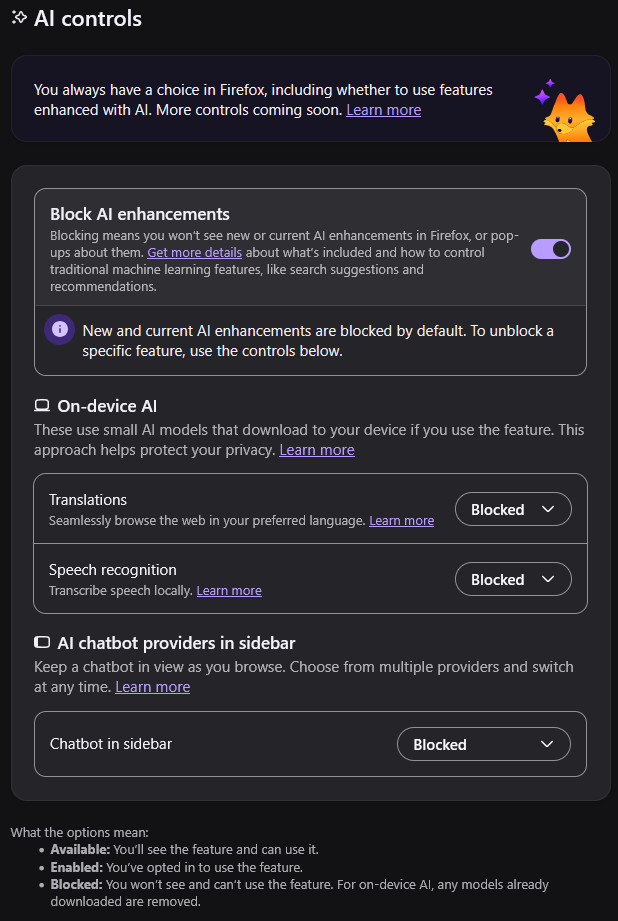
I’m sorry, I’m not often someone to whine about Firefox UI. Usually their changes have been for good actually. BUT! But but but. Proper UI design would require AI features to be disabled if the toggle is disabled. This is both highly silly and very confusing.
On device translation is amazing and exactly what this software should be approved for, I think it’s good that they let you pick this separately. I don’t care for surrendering my cognitive functions to an advertising panopticon machine, but translating pages without letting Google know what sites I’m looking at? Yes please
Especially since Google translate is just a front for Gemini these days (and not in an “LLMs were made for translating” way, you can literally prompt inject it)
I don’t recommend disabling the on-device translations and speech to text feature. Yes, they are “AI” but they are the good on-device offline AI services that are actually useful. Without the on-device translation feature, you’ll have to rely on web based Google Translate. Same with the speech to text feature.
i think you just blocked things you already blocked. that button is for blocking all at once, as per their statement
Using Librewolf solves the issues.
I moved to librewolf a few days ago. Got sick of Mozilla fucking with shit. Yes, I’m aware librewolf is Firefox underneath.
Anything is better than using yet another Chromium wrapper and pretending to use a real alternative to Chrome 😀
I’m using Zen and I haven’t seen any of this nonsense yet 🤷
This is proper UI design. What they’re doing is defaulting to have AI updates installed automatically. If you don’t want that to happen you can stop it.
Also, why does it say “blocked” instead of “disabled”? This kinda leads me to imply that their AI features are spyware
i would say it’s an intentional dark pattern
Use librewolf
I think whoever coded that views toggles as a yes/no.
Mistaaaaake
At least they are brave enough to make the switch for free.
As someone who has gone through Windows group policy, the amount of weird policies and regedits we have to do to disable AI, recall, anayltics, etc. it’s insane and the process flip flops with tricky wording. Enabling something here and disabling stuff somewhere else, it gets annoying
Pushing the opt out responsibility on the user is why I left Windows and never looked back. I recommend Waterfox which I started using a couple months back when Firefox started going in this direction. Waterfox is great on desktop and Android (which I’ll hopefully shed soon too when my current phone stops working).
I agree. This is a double negative. Language usually goes with positive statements instead of double negative. You don’t say “I didn’t fail”. You say “I succeeded”. With that logic, the UI should say “Enable AI features” instead of “Disable AI blocker”.
You do the same thing with ad blockers. They are on when you are blocking ads. This is on for blocking AI.
Ask yourself what’s the main purpose. For an ad blocker, the purpose is to block ads. The dev spent hours developing the blocking mechanism, so it’s normal that it’s called an ad-BLOCKER. For the Firefox AI features, they spent hours implementing the AI tools. Look at the pop-up blocker in Firefox. It says “block pop-ups” because that’s the feature the dev worked on.
Someone has been studying up on the Microsoft Group Policy way of wording things.
For the record, I know it was marketed as “AI killswitch”. I know it functions as one.
But it’s still hella confusing as presented in the configuration! Don’t do double negatives! If your design goal is “disable everything”, maybe give the users the option to, I don’t know, “disable everything”.
Isn’t that what it does? Except in your mind it would say “enable ai” and you’d have to enable it to access the options below.
That makes sense to me